
Hard Disk 3f0 Error on Your HP? Here’s What It Means and What to Do.
Request a Free Estimate for Hard Drive Data Recovery!

The hard disk 3f0 error is one of the more alarming messages an HP laptop or desktop owner can encounter. It can mean something as simple as a loose cable – or something as serious as complete hard drive failure. Data Savers LLC has been helping Atlanta residents and businesses diagnose and recover from hard drive errors like this for over 25 years.
Not Sure If Your Data Is Gone? Find Out for Free.
If the troubleshooting steps below do not resolve your 3f0 error, your hard drive may have failed. Reach out to Data Savers LLC today for a free, no-obligation estimate – our engineers will assess your drive and give you an honest picture of your options.
What Is the Hard Disk 3f0 Error?

The hard disk 3f0 error is HP’s version of what other manufacturers – Samsung, Toshiba, Dell, and virtually every other PC maker – display as a No Bootable Devices Found error. The message is admittedly vague, but what it essentially means is that your PC is unable to load a boot device from your hard drive.
In plain terms – your computer is turning on, but it cannot find the operating system it needs to start up. This can happen for a few different reasons, some simple and fixable at home, others more serious. The sections below will walk you through the most common causes and what you can do about each one.
Free Estimates and No Recovery No Charge
If your troubleshooting leads you to the conclusion that your hard drive has failed, Data Savers LLC is here to help. Every case starts with a free, no-obligation estimate – and if we are unable to recover your data, you will not be charged. No recovery, no fee. A standard we have upheld for over 25 years.
How to Fix the Hard Disk 3f0 Error
Before assuming the worst, it is worth ruling out two common and easily fixable causes of the 3f0 error. Work through these steps in order before concluding that your hard drive has failed.
Step 1 – Check That the Hard Drive Is Properly Connected
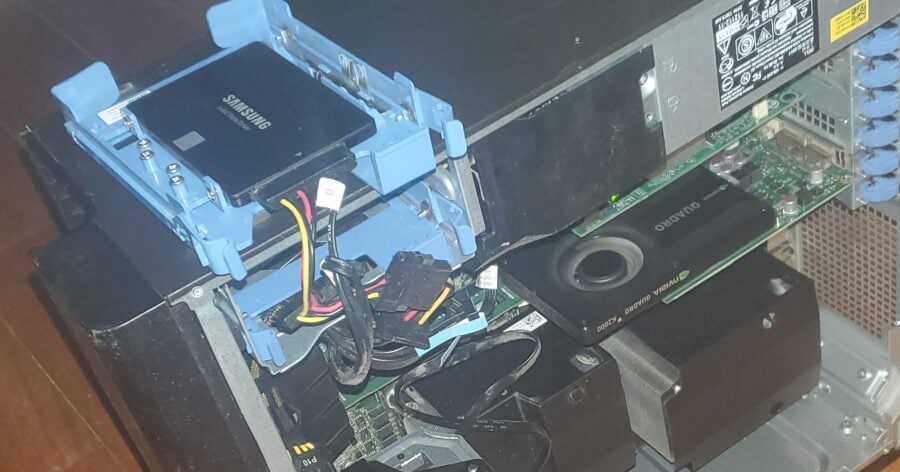
A loose or improperly seated cable connection between your hard drive and motherboard can trigger the 3f0 error. For desktop computers, shut the computer down completely and unplug it from the wall, open the desktop case, locate the hard drive which is typically a black rectangular device connected by a cable with yellow, red, and black wires, and ensure the cable is firmly and fully seated at both ends – at the hard drive and at the motherboard. For laptops, shut the computer down and remove the battery, unscrew and remove the back panel, locate the hard drive and check that its connector is fully and securely seated. If everything appears to be properly connected and you are still seeing the 3f0 error, move on to step 2.
Step 2 – Check and Adjust Your Boot Order in BIOS
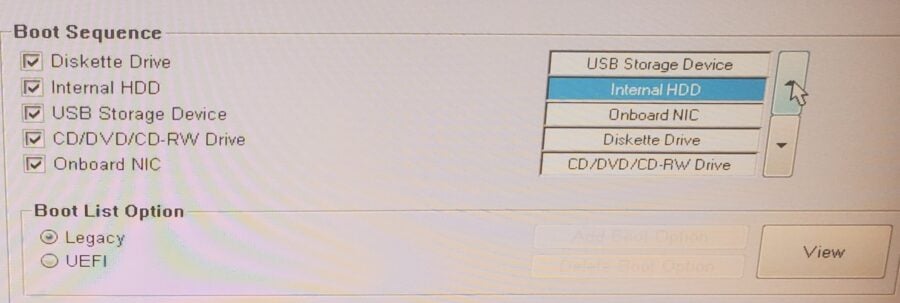
Sometimes the 3f0 error occurs because your computer is trying to boot from the wrong device – a USB drive for example – instead of your hard drive. Restart your computer and press the Escape key followed by the F2 key as the computer starts up, which should open the BIOS menu. If you are using a laptop, navigate to Storage then Boot Options. If you are using a desktop, navigate to System Configuration then Boot Options. Check the boot order list – your Internal HDD should be at the top. If a USB device or another drive is listed above your hard drive, use the on-screen prompts to move the Internal HDD to the top of the list. Save your changes and restart. Note that BIOS menus look different across different manufacturers and models so your screen may not look exactly like examples you find online. If your Internal HDD is already at the top of the boot order and you are still seeing the 3f0 error, it is time to consider a more serious possibility.
When the 3f0 Error Means Hard Drive Failure
We will not sugarcoat it – the hard disk 3f0 error also appears when a hard drive has failed completely. If you have worked through both troubleshooting steps above and are still seeing the error, there is a real possibility that your hard drive is no longer functioning.
This is understandably stressful. Losing access to your files, photos, and documents is a serious situation – and it is natural to feel frustrated or overwhelmed. The Data Savers LLC team understands, and we are here to help make the process as straightforward as possible.
The good news is that a failed hard drive does not necessarily mean your data is gone forever. In the vast majority of cases, data can still be recovered from a drive that has failed – as long as the right professionals handle it with the right equipment. What matters most at this point is that you stop trying to power on the drive and reach out to a professional data recovery lab as soon as possible.
Don’t See Your Situation Listed?
Every 3f0 error case is a little different, and not every situation fits neatly into the scenarios above. If you are unsure what is causing your error or your situation does not match what is described here, do not worry – Data Savers LLC has over 25 years of experience with hard drive boot errors of all kinds. Reach out and let us assess your specific situation.
Why Choose Data Savers LLC for 3f0 Error Data Recovery?
Data Savers LLC has been the go-to data recovery resource for Atlanta residents and businesses dealing with hard drive failures for over 25 years. The 3f0 error is one we know well – our engineers have handled countless cases stemming from this exact error message.
What we offer – industry-leading recovery success rates, a free inbound shipping label for your drive, a free no-obligation estimate before any work begins, a no recovery no charge guarantee, a Class 100 ISO-5 certified clean room for safe internal hard drive work, and customer service our clients have trusted and praised for over two decades.
Hard drives are the area where our engineers have the deepest experience – and that experience is what gives your data the best possible chance of coming back.
Ready to Find Out If Your Data Can Be Recovered?
If the 3f0 error has led you to a failed hard drive, do not wait and do not try to fix it yourself. Reach out to Data Savers LLC today for your free estimate and let Atlanta’s most experienced hard drive recovery team take it from here.