
WD Elements External Hard Drive Beeping? Stop Using It Now.
A beeping WD Elements external hard drive is never a normal sound — it is a clear sign that something has gone seriously wrong inside the device. Every second you continue to power it on makes the situation worse. Data Savers LLC has been recovering data from beeping Western Digital drives for over 25 years and we are here to help.
WD Elements Beeping? Act Now — Every Attempt Makes Recovery Harder.
Unplug your WD Elements drive immediately and do not plug it back in. Then reach out to Data Savers LLC for a free, no-obligation estimate. The sooner you stop and contact a professional, the better your chances of a full recovery.
About Western Digital Elements Drives
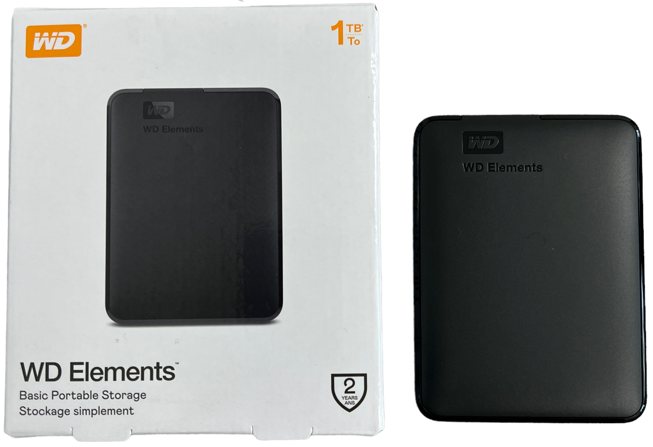
Western Digital, widely known by the initials WD, is one of the most established and respected names in electronic data storage, with a history spanning the better part of the last century. Among their most popular consumer products is the Elements series, a line of 2.5 inch and 3.5 inch USB external hard drives available in a wide range of storage capacities.
WD Elements drives are widely used for backing up computers, storing large media libraries, and carrying files between locations. They are reliable, affordable, and easy to use, but like all mechanical hard drives they are not immune to failure. And when a WD Elements drive fails, the consequences for your data can be serious.
Is Beeping Normal for a WD Elements Drive?
Hard drives do make sounds during normal operation — subtle clicking as the read-write heads move, a gentle hum from the spinning platters. These sounds vary between different drive models and are nothing to be concerned about.
Beeping is different. Beeping is never a normal sound for a functioning hard drive. If your WD Elements external hard drive is beeping, it is a clear indication of a serious internal problem, and one that will not resolve itself. The longer the drive continues to be powered on in this state, the more damage accumulates inside and the harder recovery becomes. The most important thing you can do right now is unplug the drive and contact a professional data recovery lab.
Free Estimates and No Recovery No Charge
Every WD Elements data recovery case starts with a free, no-obligation estimate. Our engineers will assess your drive and give you a clear, honest picture of your options before you commit to anything. If we are unable to recover your data, you will not be charged. No recovery, no fee — a standard we have upheld for over 25 years.
What Causes a WD Elements Drive to Beep?
The most frequent cause of a beeping WD Elements external hard drive is a head crash — a failure where the read-write heads inside the drive either make contact with the spinning platters or become unable to move at all.
Under normal operation the read-write heads float on a microscopic cushion of air just nanometers above the platter surface, close enough to read and write data without ever actually touching it. When a head crash occurs, often triggered by a physical impact, a drop, or mechanical wear, the heads can become stuck against the platters or damaged to the point where they can no longer move freely. The beeping sound you hear is the drive’s motor struggling to spin the platters while the heads are obstructed. Every time you power the drive on in this state, the damaged heads scrape further across the platter surface, destroying more data with every rotation. This is why stopping immediately is so critical.
Can You Fix a Beeping WD Elements Drive Yourself?
We understand the frustration of being told there is nothing you can do yourself, but in this case it is the honest truth, and it is important that you hear it clearly.
Do not open the drive’s case. This is the single most damaging thing you can do to a beeping WD Elements drive. The internal components of a hard drive, particularly the platters, are extraordinarily sensitive to contamination. Even a single airborne dust particle landing on the platter surface can cause permanent, irreversible damage to the data stored there.
Opening the drive breaks the factory seal, allows contaminants to enter the enclosure, and will almost certainly eliminate any remaining chance of data recovery. It will also void your warranty immediately.
Addressing a head crash requires replacing the damaged read-write heads, a procedure that must be performed in a Class 100 ISO-5 certified clean room, using a compatible donor drive’s head stack, and with the precision and expertise of a trained data recovery engineer. Data Savers LLC operates a Class 100 ISO-5 certified clean room that reduces airborne contamination to just 100 particles per cubic meter compared to approximately 35,000,000 in typical outdoor air.
Don’t See Your Situation Listed?
WD Elements drives can fail in a variety of ways beyond the beeping scenario described here. If your specific situation is not listed, do not worry — Data Savers LLC has over 25 years of experience with Western Digital external drive recovery of all kinds. Reach out and let us assess your case.
Why Choose Data Savers LLC for WD Elements Recovery?
25 Years of Experience — Our engineers have been recovering data from Western Digital external drives including the Elements series for over 25 years.
Class 100 ISO-5 Certified Clean Room — Head replacement and other internal drive work requires a certified clean room environment. Our facility maintains just 100 airborne particles per cubic meter.
Free Inbound Shipping — Local Atlanta clients are welcome to drop their drive off at our lab directly. Clients outside Atlanta receive a free inbound shipping label.
Recognized Apple Data Recovery Experts — Data Savers LLC has been recognized by Apple as experts in Apple data recovery, covering all Mac-compatible external drives including Western Digital models used with macOS.
No Recovery No Charge — If we cannot recover your data, you pay nothing. A commitment we have honored for over 25 years.
The Rules for a Beeping WD Elements Drive
Remember these before you do anything else. One — unplug it immediately, do not power it on again. Two — do not open the case, ever, under any circumstances. Three — do not take it to a general repair shop, inexpert attempts cause permanent damage. Four — contact Data Savers LLC, the sooner you act the better your chances.
Don’t Let a Beeping WD Elements Drive Become a Permanent Loss
Data Savers LLC has over 25 years of experience recovering data from beeping Western Digital external drives including cases other labs have given up on. Reach out today for your free estimate and give your data the best possible chance of coming back.