
“USB Device Not Recognized” – Here’s What to Do.
A USB device not recognized error can be frustrating and alarming – especially if there is important data on the drive. The good news is that this error sometimes has a simple fix. Data Savers LLC will walk you through the most common solutions, and if those do not work, our team of flash drive data recovery specialists is here to help. We have been recovering data from unrecognized and failed flash drives for over 25 years.
Request a Free Estimate from Data Savers LLC Today!

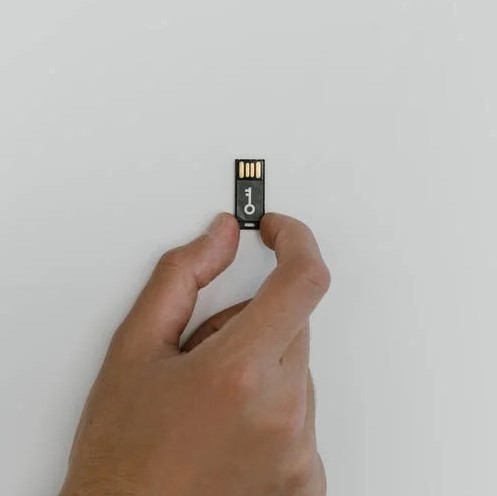
Tried the Fixes and Still Not Working? We Can Recover Your Data.
If the troubleshooting steps below do not resolve the error, your flash drive may have failed. Reach out to Data Savers LLC today for a free, no-obligation estimate and let our experienced engineers take a look.
Don’t See Your Situation Listed?
USB flash drive failures and errors can present in many different ways. If your specific situation is not described here, do not worry – Data Savers LLC has over 25 years of experience with flash drive data recovery of all kinds. Reach out and let us assess your case.
What Is the USB Device Not Recognized Error?
USB flash drives are a popular and portable data storage solution – convenient for people who work across multiple computers or need to carry files with them on the go. While flash drives are generally reliable, they are still electronic devices, and like any electronic device they are susceptible to failure.
The USB device not recognized error message is your computer’s way of telling you that it cannot communicate with the flash drive you have plugged in. This can happen for several reasons, some simple and fixable in a few minutes, others more serious. Work through the troubleshooting steps below in order before concluding that professional data recovery is needed.
Free Estimates and No Recovery No Charge
If troubleshooting does not resolve the error and your flash drive needs professional attention, Data Savers LLC is here to help. Every case starts with a free, no-obligation estimate – and if we are unable to recover your data, you will not be charged. No recovery, no fee – a standard we have upheld for over 25 years.
How to Fix “USB Device Not Recognized”
Fix 1 – Restart Your Computer Completely
This may seem like an obvious suggestion, but it is worth doing properly before moving on to more complex steps. Many electronic issues, including USB recognition errors, can be resolved by a full restart. For desktop computers, safely shut the computer down completely, unplug it from the wall, wait 30 seconds, plug it back in and power it on normally, then try plugging in the flash drive again. For laptops, shut the computer down completely, remove the battery if possible, wait 30 seconds, reinsert the battery and power back on, then try the flash drive again. If the error persists after a full restart, move on to the next step.
Fix 2 – Update or Reinstall Your USB Drivers
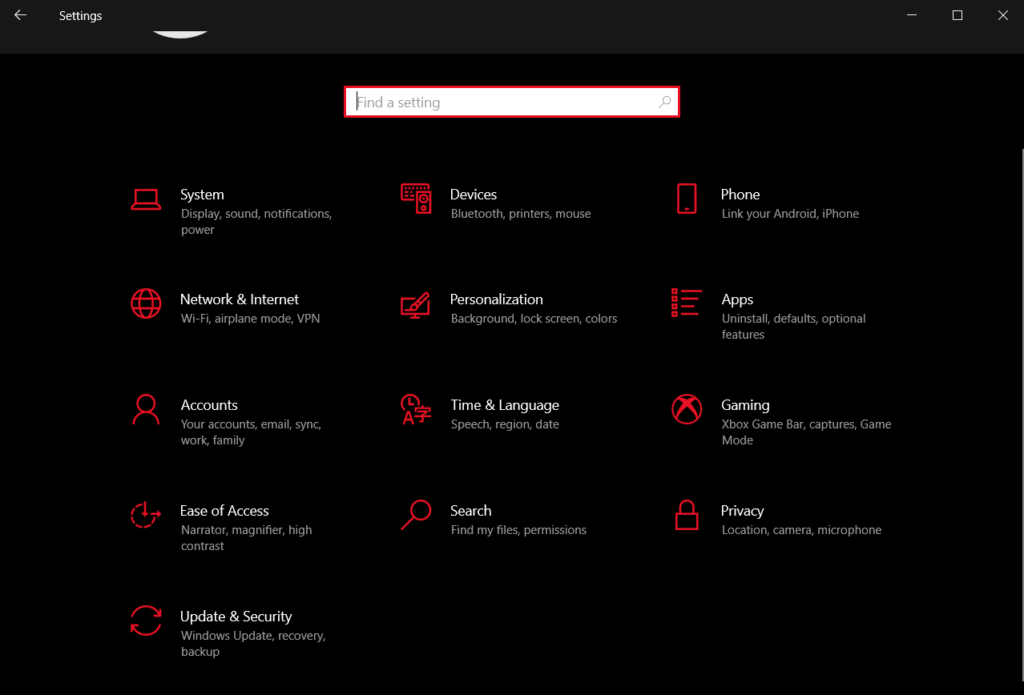
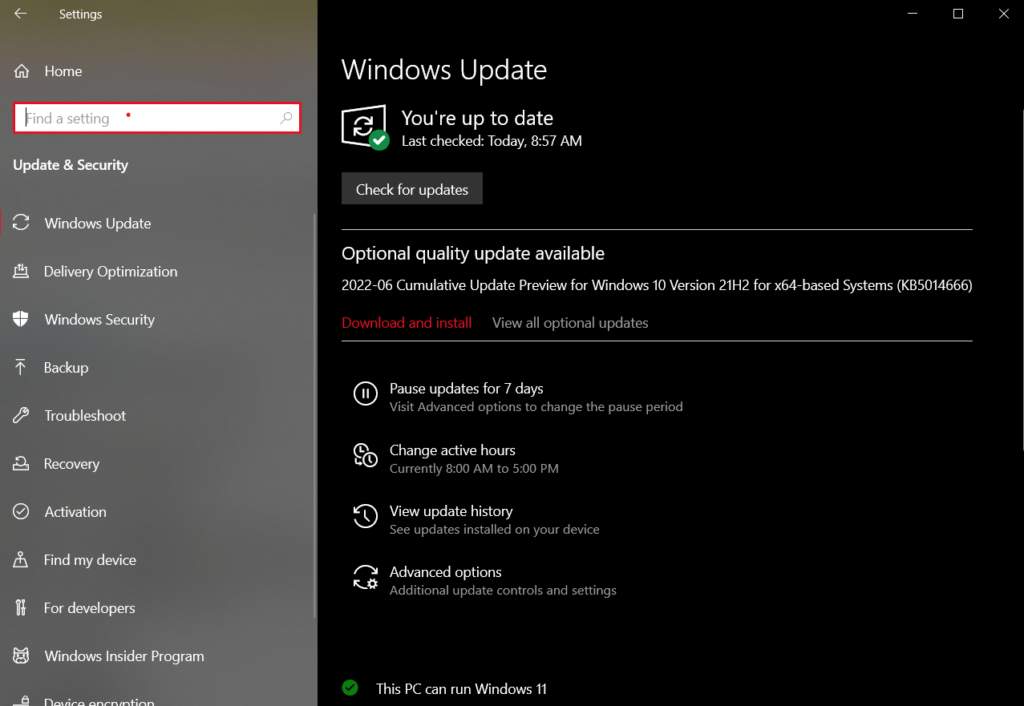
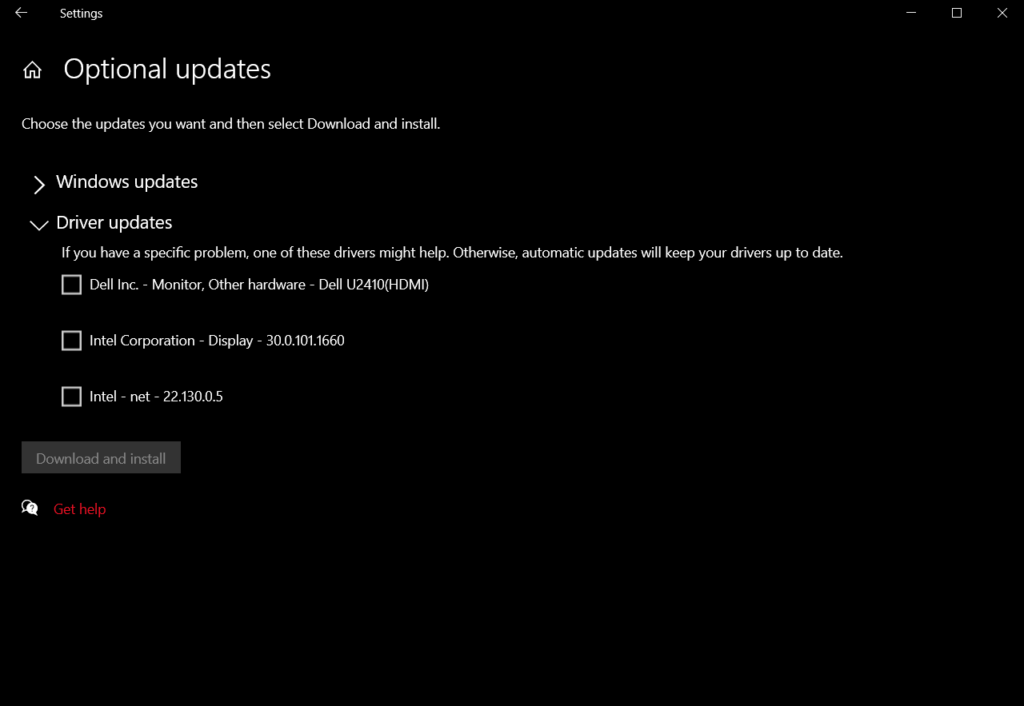
One of the most common causes of a USB device not recognized error is an issue with your device drivers. Drivers are software components that allow your operating system to communicate with hardware devices including USB flash drives. If the drivers associated with your USB port or flash drive are missing, outdated, or corrupted, your computer will be unable to recognize the device. To update or reinstall your drivers on Windows 10 or Windows 11, open the Settings menu and navigate to Update and Security, click View all optional updates, look for any available updates under the Driver updates section, select any relevant driver updates and install them, then restart your computer and try the flash drive again. It is also worth checking whether your operating system itself has any pending updates.
1. Navigate to the `Update & Security’ panel of settings
2. Select the `View all optional updates’ Option
3. Select any Relevant Options from the `Driver updates’ Menu
Fix 3 – Try a Different USB Port or Computer
Before assuming the problem is with the flash drive itself, rule out the possibility that the issue is with the USB port you are using. Try plugging the flash drive into a different port on the same computer, preferably a USB port directly on the machine rather than a hub or adapter. If you have access to another computer, try the drive there as well. If the flash drive is recognized on another computer or port, the issue is likely with your original USB port or drivers rather than the drive itself. If the drive is not recognized on any computer or port, the problem is almost certainly with the flash drive and professional data recovery may be needed.
When Troubleshooting Doesn’t Work
If you have worked through all three troubleshooting steps and the USB device not recognized error persists on multiple computers and ports, it is likely that the flash drive itself has failed – either at the logical level such as file system corruption or the physical level such as hardware failure.
At this point, continuing to troubleshoot on your own carries real risk. Further attempts to access or repair the drive without professional tools and expertise can make recovery significantly harder, or in some cases permanently impossible.
If the data on your flash drive is important, the right move is to stop trying and contact a professional data recovery lab. Data Savers LLC engineers have over 25 years of experience recovering data from USB flash drives that were not recognized, including drives with physical damage, corrupted file systems, and failed NAND flash memory chips.
Flash Drive Data Recovery With Data Savers LLC
Data Savers LLC uses specialized equipment, proprietary technology, and over 25 years of hands-on experience to recover data from flash drives that other recovery providers cannot access. Our process is straightforward – free inbound shipping means we provide a free shipping label so getting your drive to our Atlanta lab costs you nothing, a free estimate means our engineers assess your drive and give you a clear honest quote before any work begins, expert recovery means our technicians get to work using specialized flash drive recovery tools and techniques, and your data is returned to you on a new drive shipped back to you promptly. In the event that recovery is not possible, there is no charge.
Why Choose Data Savers LLC for USB Flash Drive Recovery?
25 Years of Experience – Our engineers have been recovering data from USB flash drives and other flash storage devices for over 25 years. That depth of experience with flash-specific recovery techniques is what sets Data Savers LLC apart from general IT shops.
Specialized Tools and Proprietary Technology – Flash drive data recovery often requires direct chip-level access to the NAND flash memory inside the drive, bypassing the damaged controller entirely. This requires specialized equipment and expertise that most repair shops simply do not have.
Class 100 ISO-5 Certified Clean Room – When flash drive recovery requires physical work on internal components, our certified clean room provides the contamination-free environment essential for safe professional recovery.
Free Inbound Shipping – Free ground shipping for all drives within the continental USA.
No Recovery No Charge – If we cannot recover your data, you pay nothing. A commitment we have honored for over 25 years.
Still Seeing the USB Device Not Recognized Error? Let Data Savers LLC Help.
If troubleshooting has not resolved the issue and your data is important, do not wait – contact Data Savers LLC for your free estimate today and let Atlanta’s most experienced flash drive recovery team take it from here.